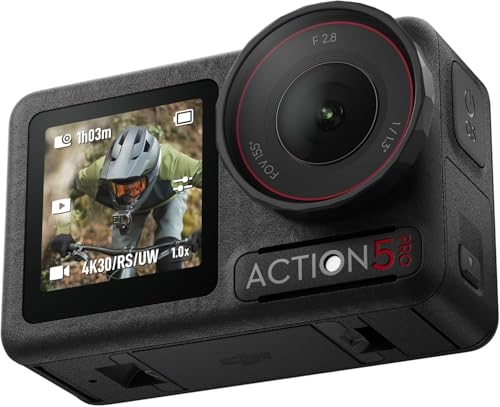
Action cameras run $120-$500. The best-value tier is $200-$300.
Record 4K 30/60 normally, 1080p for slow motion. 5.3K only when you will crop heavily.
Rated 10-12 m without a case; a dive housing reaches 40-50 m.
Overheating at high resolutions in heat is the number one failure complaint.
The mounting ecosystem matters more than the spec sheet. Buy the case even if you never dive.
Prices last verified October 2026. Action camera pricing changes with every refresh — compare current models before buying.
The eight, by tier
Rank
Camera class
Price (2026)
Max resolution
Max frame rate
Waterproof to
Battery
Best for
1
Flagship, 5.3K
$320-$420
5.3K 60
240 fps at 1080p
12 m
90-120 min
Everything, maximum quality
2
Flagship, 4K class
$280-$380
4K 120
240 fps at 1080p
12 m
85-110 min
Best overall balance
3
Mid-tier, 4K
$200-$280
4K 60
180 fps at 1080p
10-12 m
75-100 min
Most people, most of the time
4
Budget, 4K
$130-$200
4K 60
120 fps at 1080p
8-10 m without a case
60-80 min
Occasional use, kids and pets
5
Entry, 1080p
$80-$150
4K 30
120 fps at 1080p
5 m without a case
50-70 min
Helmet and handlebar footage
6
Cube or modular
$250-$400
4K 60
120 fps at 1080p
10 m
75-95 min
Second bodycam angle, vlogging
7
Refurbished flagship
$180-$260
5.3K or 4K
240 fps at 1080p
10-12 m
Varies, check health
Best value for serious use
8
360 camera
$300-$500
5.7K equivalent
Varies by output
10 m without case
60-80 min
Reframing and invisible mounting
The specs that matter versus the specs that are marketing
Action camera spec sheets lead with resolution and frame rate because they are easy to compare and easy to inflate. Neither predicts whether you will like the footage.
Get more product guides & reviews reads in your inbox
One email a day — only posts tagged Product Guides & Reviews. No spam, unsubscribe anytime.
Moderate — matters if you reframe, not if you deliver as shot
Sensor size and bitrate
Frame rate 120 vs 60
Smooth motion or slow motion capture
High if you shoot slow motion, irrelevant if you do not
Whether the high rate is available at 4K
Bitrate
Data per second, drives detail retention
Very high — the real quality differentiator
Megabits per second at your chosen mode
Sensor size
Light gathering, dynamic range
Very high — determines low light and highlight handling
Sensor dimensions, not resolution
Stabilisation generation
Electronic, optical, or hybrid
High, but implementation matters more than the number
Footage samples at your actual framerate
Horizon lock or level
Rotates footage to stay level
High for specific sports, distracting if unwanted
Whether it can be turned off
Waterproof depth
Without a housing
High for water use, and genuinely useful without a case
Whether the rating requires all ports closed
Field of view
Ultra-wide, wide, linear
Very high — distortion at the edges is permanent
Whether linear profiles exist
Battery capacity
Minutes per charge
Moderate, and easy to extend with spares
Real-world duration with stabilisation on
Microphone quality
On-board audio capture
Moderate — all are poor in wind
Whether an external mic input exists
Two of these deserve emphasis. Bitrate is what actually distinguishes good footage from compressed mush, and it is the specification most often omitted from comparison charts. Field of view matters more than resolution, because ultra-wide barrel distortion cannot be fixed in post without also cropping away the frame — a 5.3K recording from a very wide lens still looks distorted, just at a higher resolution.
Which one for which activity
Activity
Must have
Nice to have
Minimum tier
Notes
Helmet mount, cycling or skiing
Light weight, secure mount, linear FOV option
Hands-free voice control
Mid-tier
Weight matters more than resolution on a helmet
Surfing, kayaking, water sports
10 m+ waterproof without a case
Textured mode for water clarity
Mid-tier
Get the water-repellent lens protector
Cycling, handlebar mount
Vibration stabilisation, wide FOV
External mic
Mid-tier or above
Cheap cameras blur badly under vibration
Motorcycling
Robust mount, high bitrate, loop recording
Waterproof to 12 m, GPS
Flagship
Vibration destroys footage on cheap models
Underwater diving
Dive housing to 40 m, red or green filter
Large sensor for low light
Flagship plus housing
Colour disappears without a filter
Skiing and snow
Battery performance in cold
Handheld or pole mount
Any
Cold halves battery life
Family and pets
Easy operation, wide FOV
Voice control
Budget to mid-tier
Nobody wants a complicated camera for this
Talking-head vlogging
Flip-out screen, external mic input, good audio
Front-facing preview
Modular or mid-tier
Audio matters more than image here
Drone or vehicle mounting
High bitrate, wide dynamic range
Loop recording, GPS tagging
Flagship
Vibration and heat are both problems
Reframing and reframed edits
High resolution, good stabilisation
360 output
Flagship or 360
The reason 5.3K exists
Battery life, storage, and the accessories that matter
Battery duration is the constraint that shapes a trip. Every number below is realistic under continuous recording with stabilisation on, which is well below the manufacturer claim.
Camera class
Real 4K 60 battery
Real 1080p battery
Battery count for a full day
Spare battery cost
Storage per hour at 4K 60
Flagship 5.3K
55-75 min
90-120 min
3-4 batteries
$20-$30
90-130 GB
Flagship 4K
60-85 min
95-130 min
3 batteries
$20-$30
75-110 GB
Mid-tier
65-95 min
100-140 min
2-3 batteries
$18-$28
60-90 GB
Budget
50-70 min
70-100 min
3-4 batteries
$15-$25
45-70 GB
Entry 1080p
45-60 min
60-85 min
4 batteries
$12-$20
15-25 GB
The storage column is the one people underestimate most. A day of 4K 60 recording at 100 GB per hour needs a 1 TB card, and high-endurance cards are slower than standard cards at their top speed. A single day of action footage can fill a card that took three hours to transfer.
Accessory
Cost
Priority
Why
Protective lens covers, 2-pack
$10-$25
Essential
The lens is the most exposed and least replaceable part
Waterproof case
$25-$50
Essential
Adds scratch protection to the lens and enables mounting without adhesive
Spare batteries, 2-3
$40-$80
Essential
Nothing else changes the length of a trip
128-256 GB high-endurance card
$15-$30
Essential
Recording stops without it; check the maximum supported size
Head strap or chest mount
$20-$50
High
Hands-free footage from the wearer's viewpoint
Selfie stick or pole mount
$25-$60
High
The most common shot in the category
Curved adhesive mount set
$20-$30
High
Helmet mounting needs the correct curved pads
Dive housing
$60-$130
Only for diving
Extends depth to 40-50 m; add a colour filter
External microphone
$50-$150
Only for vlogging
On-board audio is unusable in wind
External power bank
$60-$120
For long sessions
Adds capacity but needs a cable and adds bulk
The Picks, and Where Each One Fits
Four cameras cover the realistic choices for 2026, and the gap between them is smaller on paper than it feels in use. What actually separates them is sensor size, stabilisation, and how the camera behaves when the light drops. The tiny camera has a place, but it is a place at the edge of the category rather than in the middle of it.
Product
Max resolution
Sensor
Waterproof to
Best for
GoPro Hero 13 Black
5.3K at 60
1/1.9 inch
10 m
Maximum quality, whatever the activity
DJI Osmo Action 5 Pro
4K at 120
1/1.1 inch
20 m
The best all-rounder for mixed shooting
Insta360 Ace Pro 2
4K at 60
1/1.1 inch
10 m
Best value, and the easiest to edit
Insta360 GO 3S
4K at 30
Small 1/2.3 inch
30 m with case
Mounting where the camera has to disappear
GoPro Hero 13 Black: the flagship, and the safe default
This is the camera to buy when you shoot in difficult light and want the footage to look right without post processing. The 1/1.9 inch sensor is the largest in this group, which is what produces the cleaner image when the sun is low or you are under tree cover, and 5.3K at 60 gives you room to crop and reframe in an editor without losing detail. Waterproofing to 10 metres means it survives surf, snow, and rain without a case, which matters because a case that fogs or rattles ruins more footage than a slightly lower resolution would. The trade is price, and the fact that it is the heaviest and most conspicuous of the four.
DJI Osmo Action 5 Pro: the one that works in more places
The Osmo Action 5 Pro is the pick if you shoot in more than one environment, because it handles the situations that stop other cameras. Waterproof to 20 metres without a case, a 1/1.1 inch sensor for low light, and 4K at 120 for slow motion that survives a crop. The magnetic mount is the underrated part: it holds position through vibration and it takes seconds to swap between a helmet mount, a bike mount, and a tripod. It is also the cheapest of the three full size cameras here, which is difficult to explain on the specification sheet and obvious in a shop.
Insta360 Ace Pro 2: the value pick with the easiest workflow
The Ace Pro 2 puts a 1/1.1 inch sensor and 4K at 60 in a body that costs less than the two flagships, and the editing app is where it pulls further ahead. The reframing tools let you change the framing of a shot in the app after the fact, which effectively turns a narrow lens into a wide one without any extra hardware, and the automatic highlight and colour handling saves a lot of time on mixed outdoor footage. The trade is battery life and raw sensor quality: it gives ground to the GoPro in very low light and to the DJI in sustained high frame rate work.
Insta360 GO 3S: the camera you can forget you are wearing
The GO 3S does one job, and it does it in a way nothing else here can. It is small enough to clip to a shirt, a cap, or a strap, it weighs almost nothing, and it shoots 4K at 30 with a wide lens that captures the whole scene without any of the mounting fuss of a larger camera. With the case it is waterproof to 30 metres, which covers surfing, kayaking, and diving far better than any of the others. The limits are honest ones: 4K at 30 is not enough for slow motion that matters, the sensor is small so low light is poor, and there is no replaceable battery. It is a second camera, not a first one.
What to Buy at Which Budget
Budget
Buy
Why
Skip
Under 200 dollars
Insta360 GO 3S
Mount it anywhere and forget about it
Using it as your only camera in low light
200 to 350 dollars
Insta360 Ace Pro 2
Big sensor, best value, easiest editing
Paying flagship money for a narrow lens
350 to 450 dollars
DJI Osmo Action 5 Pro
20 m waterproof, magnetic mount, 4K 120
A camera you will not mount properly
450 dollars and up
GoPro Hero 13 Black
The best sensor and the best stabilisation
A flagship if you only shoot in daylight
The Accessories That Actually Matter
Accessory
Cost
Priority
Why
Protective lens covers, 2-pack
10 to 25 dollars
Essential
The lens is the most exposed and least replaceable part
128 or 256 GB high endurance card
15 to 30 dollars
Essential
Recording stops without it, and check the maximum supported size
Spare batteries, 2 to 3
40 to 80 dollars
Essential
Nothing else changes the length of a trip
Mount for your activity
20 to 50 dollars
High
A camera you cannot mount is a camera you will not use
Waterproof case
25 to 50 dollars
Only for the GO 3S
The others are waterproof to depth without one
One thing worth adding to any of these purchases. The batteries are the consumable that limits how long a trip actually lasts, and a single battery rarely covers a full day of shooting at the highest resolution. Two or three spares and a charger that runs while you charge another pack will do more for your footage than any accessory at the same price, because it removes the moment where you stop recording because the battery died.
The failure modes, and how to avoid each
Failure
Cause
Prevention
Recoverable
Overheating shutdown
High resolution and frame rate in heat
Lower the resolution, remove the case, do not leave in a hot car
Yes, by cooling down
Lens scratches
Mounting without a case, wiping with grit
Keep lens covers on, rinse before wiping
No, lens is expensive to replace
Fogging inside the lens
Condensation from temperature change
Keep it sealed and out of the bag between uses, not in a hot vehicle
Yes, by drying it out
Water ingress
Missing gasket, port cap off, rinse failure
Check gaskets every time, rinse salt water with fresh
No — this is the fatal one
Corroded contacts
Salt water not rinsed
Rinse and dry after every salt water use
Sometimes, with contact cleaning
Vibration blur
Cheap stabilisation on a handlebar or motorcycle
Use a stabilised mount, or edit stabilise in post
Yes, in post
Battery swelling
Heat, long storage at full charge
Store at 40-60% charge, cool and dry
No, replace the battery immediately
Card corruption
Removing the card while recording, or a slow card
Format in camera, use high-endurance cards, eject properly
Sometimes with recovery software
The short version
Buy a mid-tier 4K 60 camera at $200-$280 for general use, and a flagship at $280-$420 only if you shoot 5.3K for reframing or do demanding low-light work. Budget $100-$150 for the essentials — two spare batteries, a waterproof case, lens covers, and a 256 GB high-endurance card — because those matter more to whether you get usable footage than the extra resolution does. Rinse with fresh water after every salt water session and do not record 5.3K in a hot vehicle.
As an Amazon Associate, Tutorsbot earns from qualifying purchases. Disclosure.
#best action cameras#action camera reviews#best action camera for hiking#4k action camera#action camera comparison
Fazlur Rahman is the founder of Tutorsbot, building AI-powered tools for learning and career growth. He writes about applying AI in real products and the practi… Read moreShow less
Fazlur Rahman is the founder of Tutorsbot, building AI-powered tools for learning and career growth. He writes about applying AI in real products and the practical side of building an ed-tech startup.

 Fazlur Rahman